Showing posts with label Tutorial. Show all posts

Sony NEX-7 Rear Button Focus

Wednesday, June 19, 2013

sony nex-7 rear button focus

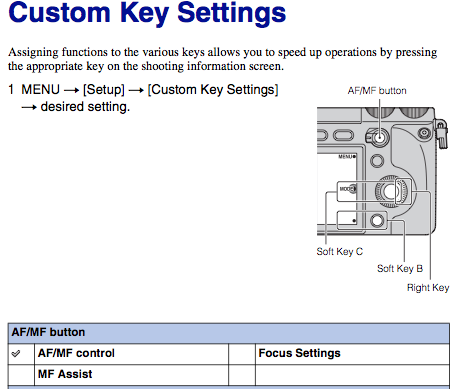
Figure 1. Rear Button aka AF/MF Button Controls Autofocus.


Here's a way to autofocus using the rear AF/MF button instead of the shutter button. You can then separate focus from locking exposure with the shutter button half press. This will also prevent the lens from prefocusing when in AF or DMF mode.

Setting up the NEX-7 to use AF/MF Rear Button Focus.
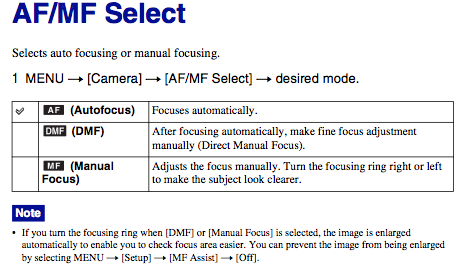
  • Set the camera to Manual Focus, Figure 2.
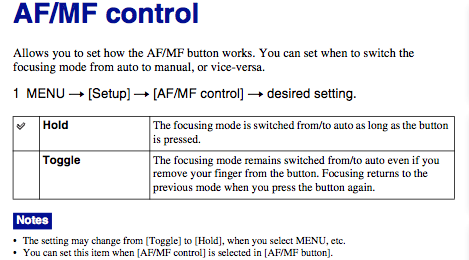
  • Set the AF/MF Control to HOLD, Figure 3.
  • Set the AF/MF Button to AF/MF Control, Figure 1.
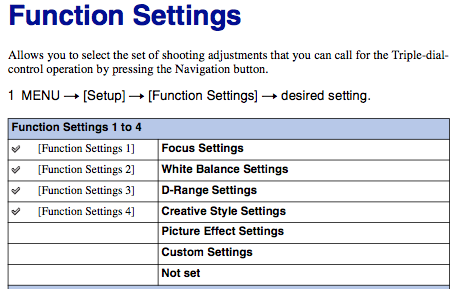
  • Set the Function Button to Focus Settings, Figure 4. This will let us control the focus point via Flexible Spot. You can also use Center focus point then Recompose. The camera must be in MF or DMF mode, Figure 2., to use Focus Settings.


sony nex-7 rear button focus

Figure 2. Set the camera to MANUAL FOCUS.


sony nex-7 rear button focus

Figure 3. Set the AF/MF Control to HOLD.


sony nex-7 rear button focus

Figure 4. Set Function Button to Focus Settings.


Here is the Sony NEX-7 Manual for download for more info.

What Shutter Sound? Sony DSC-RX1

Sunday, December 9, 2012

Sony DSC-RX1 Shutter Sound


GPSVista compares the standard shutter sound of the Sony RX1 and the lack of shutter sound when it is disabled. The shutter sound can be silenced by turning off Audio Signals via Setup Menu #3, shown below.

Sony RX1 Setup Menu #3


Thanks GPSVista!

Sony NEX-6 Infrared Conversion by IR-Photo.net

Thursday, November 15, 2012


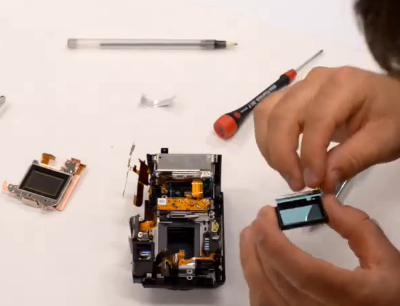
sony nex-6 infrared disassembly video

Sony NEX-6 Disassembled for Infrared Conversion


Wiebe from IR-Photo.net uploaded his Sony NEX-6 infrared conversion tutorial video and here it is. Check out 4:59 for a surprise.

Visit IR-Photo.net for a more detailed NEX-6 disassembly and infrared conversion tutorial.

Thanks Wiebe and IR-Photo!

Download Sony NEX-F3 Manual in PDF

Wednesday, June 13, 2012

sony nex-f3 manual download pdf

Sony NEX-F3 Parts and Controls


Here is the Sony NEX-F3 instruction manual in Adobe PDF. It provides descriptions of the cameras controls, basic operation, and general usage recommendations. The NEX-F3 manual in PDF can be previewed and downloaded here via Google Drive.

USB charging for NEX cameras introduced with the Sony NEX-F3, shown below.

sony nex-f3 manual download pdf

Sony NEX-F3 USB Charger and AC Adapter


The alpha manual for the Sony NEX-F3 provides further instruction on using the camera. The alpha manual shows how to use the extensive features of the NEX-F3. The alpha manual for the NEX-F3 can be previewed and downloaded here.

Below is a new feature for the NEX system introduced by the Sony NEX-F3.
sony nex-f3 manual download pdf

Sony NEX-F3 Auto Portrait Framing


Some picture effects available on the NEX-F3.
sony nex-f3 manual download pdf

Sony NEX-F3 Picture Effects

Sony NEX-3 Surgery

Monday, April 30, 2012

Sony NEX-3 Shutter in Action


erkinson the disassembler posted his NEX-3 surgery. The guide takes you all the way down to the 14.2 megapixel sensor. Check out the step by step procedure at erkinson.altervista.org.

sony nex-3 disassembly guide

Sony NEX-3 14.2 MP Sensor by erkinson


Thanks erkinson!

Sony NEX-7 Wired Shutter Release Mod

Saturday, April 21, 2012

sony nex-7 wired shutter release disassembly

Sony NEX-7 Wired Shutter Release by Trunk at GetHypoxic.com


Trunk contacted us again with his new mod. This time it's a wired shutter release for the Sony NEX-7. It was about a year ago that we posted Trunk's wired shutter release for the Sony NEX-5.

If you are using the NEX-7 in modes other than P,S,A, or M the wireless Sony NEX Remote will not work and the Self-Timer is also inaccessible.  Trunk has the solution for the NEX-7.  He goes through a step by step procedure on modding the NEX-7 for a wired shutter release.  The process is very complex and will void your warranty.  Do it at your own risk or contact Trunk as he may offer the modification service.

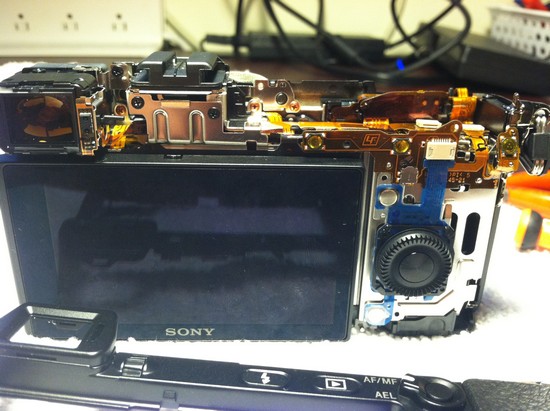
 Check out gethypoxic.com for Trunk's NEX-7 wired shutter release.  Here are some pictures by Trunk showing the insides of the NEX-7 and the finished product.

sony nex-7 wired shutter release disassembly

sony nex-7 wired shutter release disassembly

sony nex-7 wired shutter release disassembly

Images by Trunk at GetHypoxic.com


Thanks Trunk!

Sony NEX-7 Dial Wheel Lock Option?

Friday, March 30, 2012


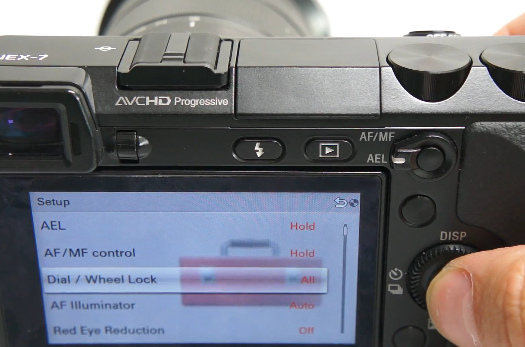
Have you finished reading the 211 page manual for the Sony NEX-7 yet? You may have run into this Dial / Wheel Lock option in the Setup Menu and tried to guess what it was. We had no clue until we ran into the video above by SonyAlphaSupport.

The Dial / Wheel Lock option can be found on the 1st screen (top) of the Setup Menu. It can be set to All, Control Wheel, or Off. When it is set to All, the Tri-Navi controls can be locked by holding down the Navigation Button of the NEX-7 for around 2 seconds. This means that whatever the Tri-Navi controls are controlling cannot be accidentally changed without unlocking them. The unlocking process is the same as the locking process.

sony nex-7 dial wheel lock iso

Dial / Wheel Lock option in NEX-7 Setup Menu

A more useful option might be setting the Dial / Wheel Lock to Control Wheel. The Control Wheel is usually the ISO dial so it can be locked and unlocked by holding down the Navigation Button for around 2 seconds.

A lock icon shows up on the top right of the screen when the Dial / Wheel Lock is activated. It blinks orange when the dials are moved while they are locked.


sony nex-7 dial wheel lock iso

Navigation Button located next to NEX-7 Shutter Button


To date we have had no issues of accidentally changing our settings by inadvertent movement of the Tri-Navi dials but this is a good option to have.

Thanks SonyAlphaSupport!

How To Clean a Sony NEX Camera

Thursday, February 9, 2012


We have not experienced any visible dust on our images yet. We always make sure that the camera is turned off before changing the lens. We also try to change it only when we are indoors. We've never used cleaning mode on the NEX so the video is quite helpful.

From Sony's website:
Clean the dust or debris on the image sensor by performing the automatic cleaning function of the camera. If dust remains, use a blower.

Sony cannot honor the warranty if the user cleans the image sensor surface with a commercial solution. We recommend only using the blower to remove dust particles.

If dust still remains even if you try the above, consult your Sony dealer or local authorized Sony service facility.


sony nex-5n cameras lenses system

Sony NEX-5N Family

Sony NEX-5N Users Guide Video

Friday, December 30, 2011


Just got your Sony NEX-5N or looking at getting one? Clear 18 minutes of your day and watch the NEX-5N tutorial courtesy of Sony Asia. Download the NEX-5N Manual and follow along and take notes. This is a good crash course on your camera when you're not out there shooting.

Download Sony NEX-7 Users Manual in PDF

Saturday, December 17, 2011

sony nex-7 manual pdf download owner user

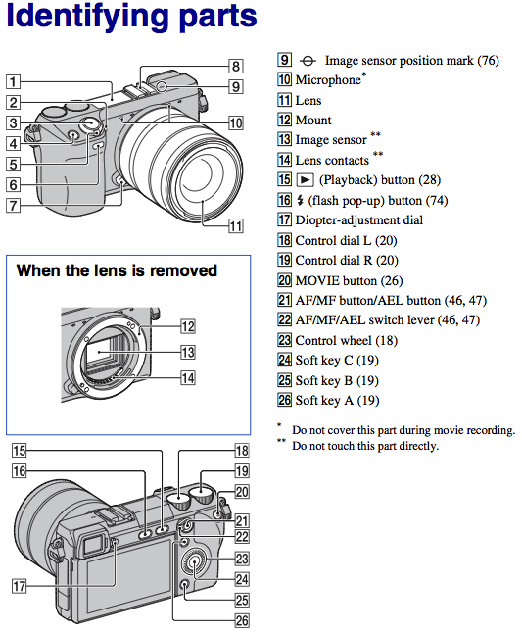
Sony Alpha NEX-7 Parts from the Manual


Here is the Sony NEX-7 User's Manual in PDF. It contains a lot of information which will make the NEX-7 experience more enjoyable. Read through the manual multiple times while you wait for your NEX-7.

Download the Sony NEX-7 manual in PDF here.

Here are some NEX-7 features that we found interesting.

sony nex-7 manual pdf download owner user

Sony NEX-7 Face Recognition for Up To Eight Faces


sony nex-7 manual pdf download owner user

Viewing NEX 3D Pictures on a 3D TV


You can also download the NEX-7 brochure here.

Sony NEX Camcorder Manuals PDF Download

Wednesday, November 23, 2011

Here are the owner's, instruction, or operator's manual for the Sony NEX-VG10, NEX-VG20, and NEX-FS100 Handycam Camcorders. The user guides below should be read by owners and perspective owners.


sony nex vg20 download pdf manual

Sony NEX-VG20 Handycam Camcorder


sony nex fs100 download pdf manual

Sony NEX-FS100 Super 35 Digital Motion Camcorder


sony nex vg10 download pdf manual

Sony NEX-VG10 Handycam Camcorder


We are using Dropbox to host the NEX manuals for free. Click here for an invite.

NEX Tips and Tricks for Filmmakers

Wednesday, July 13, 2011


Here is Adam Roberts' tips and tricks on using the NEX-5 for film making. He discusses setting up the soft keys to help in creating videos. He then goes through the custom white balance setting. He used a very flat setting for the videos, reduced contrast, reduced saturation, and reduced sharpness, which was changed through the NEX's Creative Style menu.

After the NEX-5 settings, he discusses the hardware he used. He quickly talks about lens adapters, third party lenses, Lensbaby Tilt Transformer, and follow focus.

sony nex-5 follow focus shoot35

NEX-5 with Shoot35 Follow Focus


The last part of the video is on video workflow. Adam R. used AVCHD (.MTS) to film with the NEX-5. The files (.MTS) were then converted to quicktime files (.MOV) by using ClipWrap before using Final Cut Pro to do the final edit.

Here is "Another Yesterday" by Adam Roberts using the tips and tricks in the video above.


Thanks Adam R and for the tip Anon on 6/21!

Adjust Infinity Focus on NEX Lens Adapters

Sunday, April 17, 2011

sony NEX lens Adapter Adjust Infinity


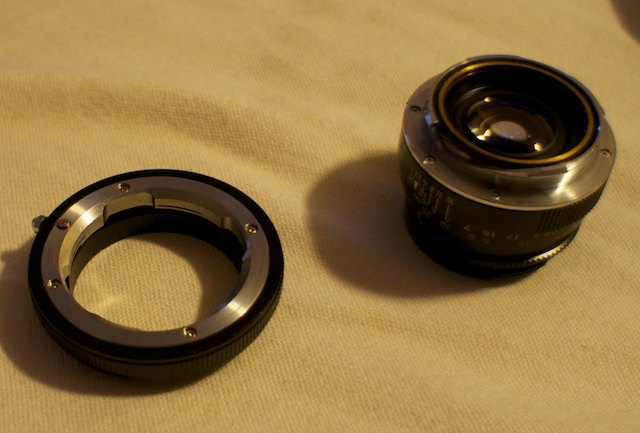
Here is a generic Leica M to Sony NEX E-mount lens adapter. The adapter allows for infinity focus but it occurs before the infinity mark. We wanted to get closer to the infinity mark so we took off the (4) screws that attach the silver part to the black part. We used a precision slotted screwdriver and made sure not to strip the very tiny screws.


We used pieces of aluminum foil to add thickness to the adapter. This will get the Leica M lens farther away from the Sony NEX sensor and infinity focus should be closer to the infinity mark on the lens. If the foil is too thick, the lens will be too far away and infinity focus may not be achieved.

Reassemble the adapter and test the lens for infinity focus.